Once our Internet connection functional, it is time to prepare our disks for the installation. Use the fdisk -l command to identify the correct drive to prepare and format. If it is a SATA drive the identifier should be of type /dev/sdX, and if it is a NVMe drive the identifier should be of type /dev/nvmeXn1.
Once your correct drive identified, we will create on this drive a new partition table. Run fdisk on the drive, if we take the example of /dev/nvme0n1, we would have:
fdisk /dev/nvme0n1
Once in fdisk, enter "g" first to create a new GPT partition scheme, and then enter w to write the new partition table and exit fdisk.
Now, for the partitions, we will use cgdisk:
cgdisk /dev/nvme0n1
We will create 3 partitions for our new Gentoo installation. Here is a table showing the partitions you need:
| Partition | Filesystem | Size | Reference | Label | Mountpoint(s) |
|---|---|---|---|---|---|
| /dev/nvme0n1p1 | FAT16 | 1024 MB | EF00 | EFI | /boot/efi |
| /dev/nvme0n1p2 | (Swap) | 16 GB | 8200 | SWAP | (Swap) |
| /dev/nvme0n1p3 | BTRFS | (Rest of the drive) | 8300 | ROOT | / and /home |
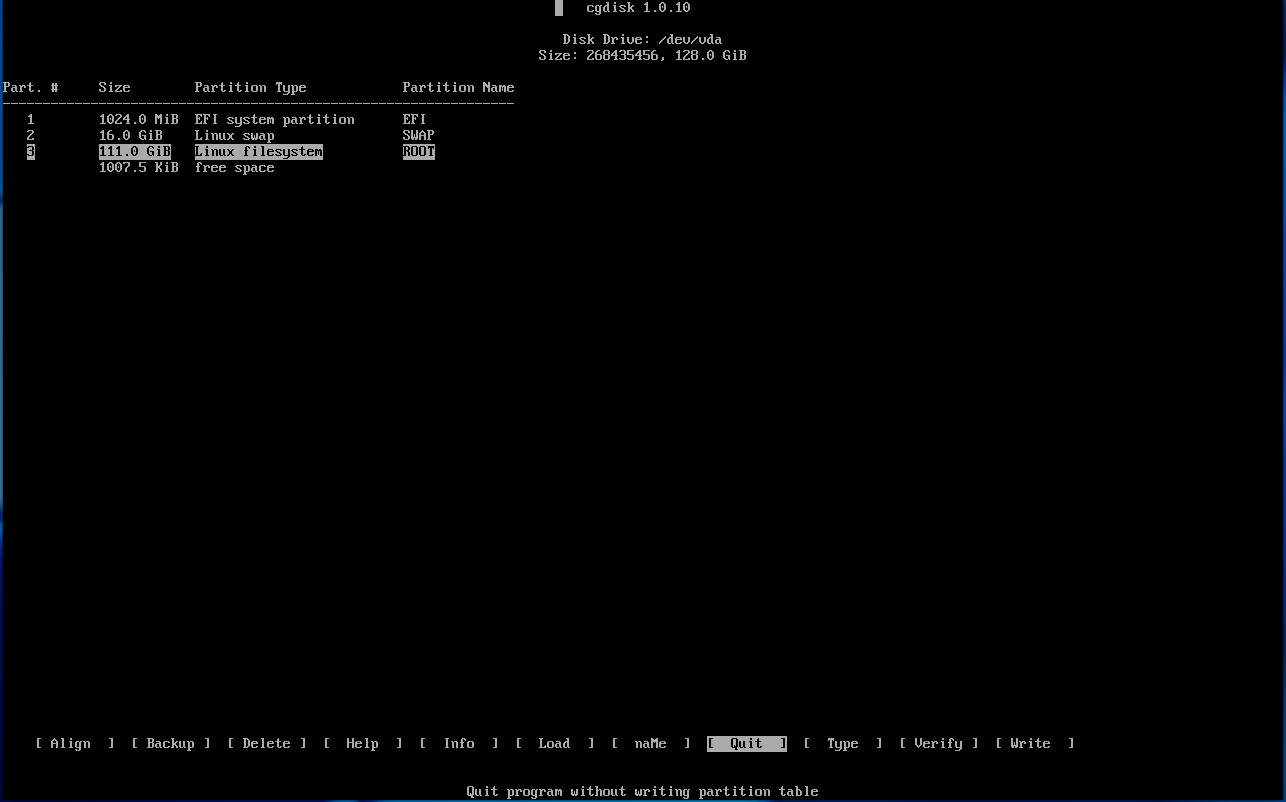
Once the partitions created, do not forget to Write the changes to the disk before leaving cgdisk. Here is a screenshot of what the partition layout should look like in cgdisk:
It is now time to create the filesystems on our partitions. Let's start with the EFI partition:
mkfs.fat -F16 /dev/nvme0n1p1
Now, the swap partition:
mkswap /dev/nvme0n1p2
And finally, the root partition:
mkfs.btrfs /dev/nvme0n1p3
After formatting our partitions it is time to proceed with the mountpoints. Let's start with the easiest, mounting the swap partition:
swapon /dev/nvme0n1p2
Then we will temporarily mount our root partition so we can create on it two BTRFS subvolumes, before unmounting it:
mount /dev/nvme0n1p3 /mnt/gentoo
Creating the subvolumes:
btrfs subvolume create /mnt/gentoo/@ /mnt/gentoo/@home
We unmount (temporarily) the partition...
umount /mnt/gentoo
...Before remounting it properly using the subvolumes:
mount -o compress=zstd,subvol=@ /dev/nvme0n1p3 /mnt/gentoo
Now let's create the missing mountpoints:
mkdir /mnt/gentoo/{boot,boot/efi,home}
And now we can mount our other BTRFS subvolume...:
mount -o compress=zstd,subvol=@home /dev/nvme0n1p3 /mnt/gentoo/home
...And our EFI system partition:
mount /dev/nvme0n1p1 /mnt/gentoo/boot/efi
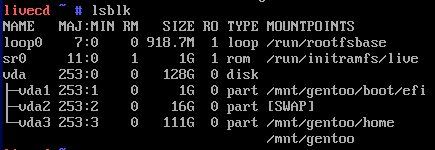
Once done, we check using the lsblk command that we have properly mounted all of our partitions, before proceeding with the next step. Here is a screenshot of the mountpoints:
 Next page